Renewing your road tax could be a hassle, especially when you need to drive to the nearest post office or Jabatan Pengangkutan Jalan (JPJ) office, queue patiently and pay for it.
Renewing your road tax online is a quick and straightforward task that you can complete in just a few minutes. All you need to do is enter some of your detail and submit them. Once payment has been made, you will just need to wait for your renewed road tax sent via post to your house or office.
Disclaimer: This is only applicable for the vehicle that is registered under a personal name.
Yes, some charges are applied, namely service charges and the delivery fee, which you would opt for physical renewal. But with the Covid-19 pandemic, this might be a safer option.
Here are the delivery charges for road tax renewal via MyEG.
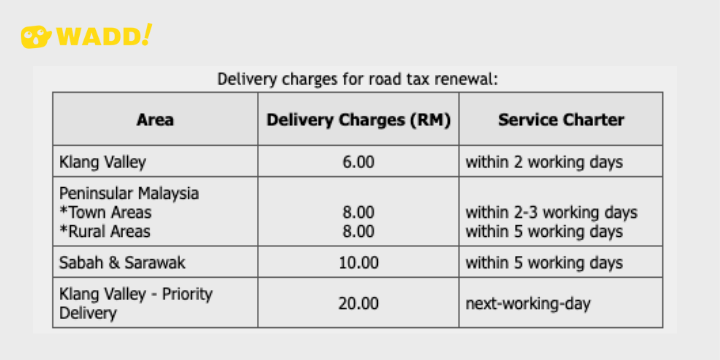
Image source via MyEG
Here is how you renew your road tax online via MyEG.
1. Go to the website MyEG.

Image source via MyEG
2. If you do not have an account with MyEG, then select "Create Account". If you do, proceed to Step 5.

Image source via MyEG
3. Click on the "Account Type" - Individual. Fill up the rest of the information, including selecting your username and passwords; name, gender, IC number, address, contact number. Once done, click "I'm not a robot" and click "Enter details".

Image source via MyEG
4. Log in to your account with the eServices username and Password.

Image source via MyEG
5. Click on the Jabatan Pengangkutan Jalan logo.

Image source via MyEG
6. Here, you can check all the other services provided online. Click on the "Road Tax Renewal" box.

Image source via MyEG
7. Click on the "X" on the notification.
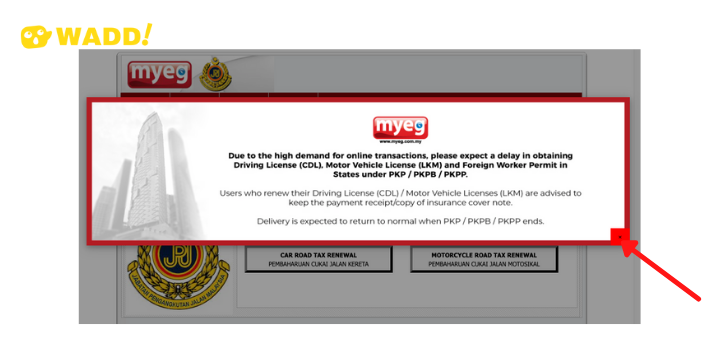
Image source via MyEG
8. Then select either "Car Road Tax Renewal" or "Motorcycle Road Tax Renewal".

Image source via MyEG
9. Enter all the required information, Owner IC/Passport, Name, Telephone, Email, Vehicle Registration No, Citizenship and Renewal Period. You may choose to renew your road tax for either six months or one year. The current option for collection is through postage. Key in the"Keyword" and click "Proceed".

Image source via MyEG
10. Check all the information input. Here, you will see the total charges incurred, including the e-Service charge and delivery charges. Once confirmed, click on the "Confirm & Pay/ Proceed" button.

Image source via MyEG
11. Please check if you have the pop-up blocker turned on. If yes, allow pop-up before proceeding to the next step.

Image source via MyEG
11. Check the box to agree to the amount to be paid. If you are paying via Credit card/Debit Card/ Online banking, click "Other Payment Option". Please take note currently, only "Online Banking" is available.

Image source via MyEG
12. Check your ID Number and Amount on the left, and once correct, proceed to check the box located at the bottom of the page before clicking "FPX Internet Banking".

Image source via MyEG
13. Proceed to select your bank of choice and the rest of your payment function.
14. After payment, you will receive the confirmation slip where you can print it out immediately.

Image source via MyEG
It is important to note that the road tax renewal rate is standardised on the MyEG website for the whole of Malaysia. East Malaysia road tax rate is slightly cheaper compared to West Malaysia.